
Internet television subscriptions

Marinios IPTV — modern streaming for live TV & entertainment

Flexible subscriptions from one to twelve months, priced by how many devices watch at once. Set up on the Smart TV, streaming stick, phone or computer you already own, with written guidance at every step.

  • One to five simultaneous connections
  • Guides for every device family
  • Totals confirmed before you pay
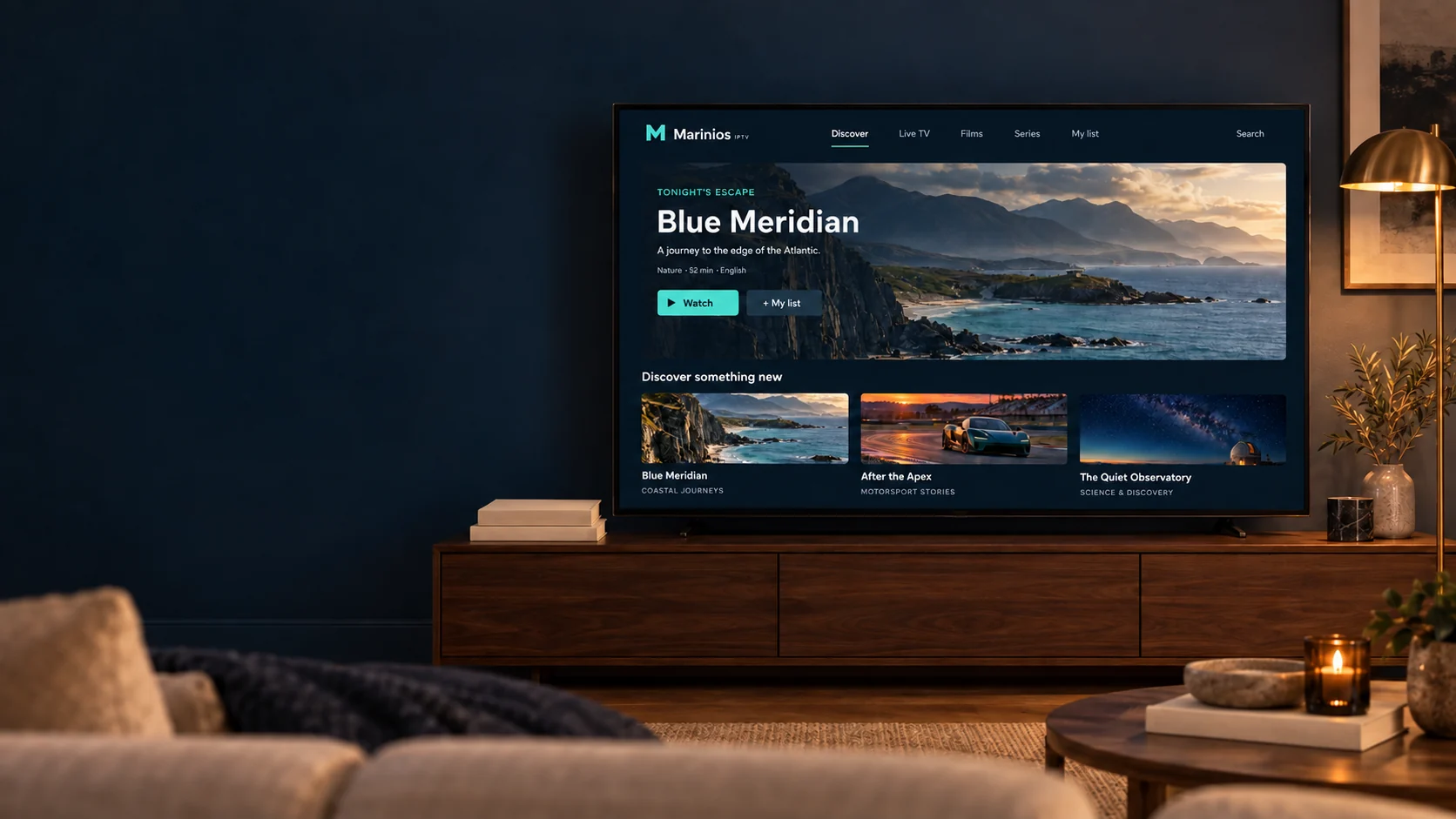
A television in a warmly lit living room showing an example Marinios IPTV browsing screen.
Two people relaxing on a sofa in front of a television showing Marinios IPTV.

How it works

Television over your broadband, not a dish or a cable box

IPTV means internet protocol television: the channels and on-demand titles reach you over the same broadband connection you already use, instead of a satellite dish or a cable line. There is no engineer visit and no extra box to rent.

When you subscribe we send you a set of credentials — typically a playlist address with a username and password. You enter those once into an IPTV player app on your device, and the app loads the channel list, the programme guide and the on-demand library.

  • Your login credentials and the guide for your device
  • Live channels, films and series in one interface
  • An electronic programme guide with catch-up where the source provides it
  • A written conversation with our team if a step does not match your screen

Subscription plans

Choose a duration, then the number of connections

Every plan includes the same content and features. The difference is how long it runs and how many devices can stream at the same moment.

1-Month IPTV

A short commitment for viewers who want to try the service month by month.

$14.99 / 1 month

Advertised price in USD.

Simultaneous connections

Selected: 1 device — $15

  • 39,000+ channels
  • 50,000+ TV series
  • 180,000+ movies
  • 4K Ultra HD quality where the source supports it
  • EPG and 7-day catch-up
  • Activation handled by our team
  • Works with common IPTV player apps
  • WhatsApp support for setup and billing
Enquire: Get 1 Month

Opens WhatsApp with your selection filled in. We confirm the exact total in writing before any payment — nothing is charged from this website.

3-Month IPTV

A flexible entry option for those who want to try the service without a long-term commitment.

$28.99 / 3 months

Advertised price in USD.

Simultaneous connections

Selected: 1 device — $28

  • 39,000+ channels
  • 50,000+ TV series
  • 180,000+ movies
  • 4K Ultra HD quality where the source supports it
  • EPG and 7-day catch-up
  • Activation handled by our team
  • Works with common IPTV player apps
  • WhatsApp support for setup and billing
Enquire: Get 3 Months

Opens WhatsApp with your selection filled in. We confirm the exact total in writing before any payment — nothing is charged from this website.

6-Month IPTV

A balanced medium-term option for viewers who want more value without committing to a full year.

$44.99 / 6 months

Advertised price in USD.

Simultaneous connections

Selected: 1 device — $45

  • 39,000+ channels
  • 50,000+ TV series
  • 180,000+ movies
  • 4K Ultra HD quality where the source supports it
  • EPG and 7-day catch-up
  • Activation handled by our team
  • Works with common IPTV player apps
  • WhatsApp support for setup and billing
Enquire: Get 6 Months

Opens WhatsApp with your selection filled in. We confirm the exact total in writing before any payment — nothing is charged from this website.

How these prices work

The large figure on each card is the advertised price for that duration. The connection selector below it shows the confirmed amount for the number of devices you want to stream on at the same time, which is the figure we quote on your order.

This website does not take payments. Selecting a plan opens a WhatsApp message with your choice filled in, and we confirm the exact total and the available payment methods in that conversation before anything is charged.

Why choose us

Why choose Marinios IPTV?

Six things that describe how the service actually works, rather than promises we cannot keep.

Works with the devices you own

Your subscription is delivered as standard IPTV credentials, so it works through common player apps on Smart TVs, streaming sticks, phones, tablets and computers. No dedicated hardware purchase is required.

Guided setup, not guesswork

Every device family has a written guide with the exact fields to complete. If a step does not match what you see on screen, send us a message and we will walk you through it.

Choose your own commitment

One, three, six and twelve-month durations are available, each priced by the number of simultaneous connections you need. Start short and extend later if the service suits you.

Quality that follows the source

Streams are delivered at the resolution the source provides, up to 4K Ultra HD where available. We tell you what affects picture quality so you can set realistic expectations before you subscribe.

A person to talk to

Questions about plans, activation, renewals or playback go straight to our team on WhatsApp. You will get a written answer rather than an automated reply.

Clear terms before you pay

We confirm the plan, the number of connections and the exact amount with you before any payment is taken. Nothing is charged automatically from this website.

Channels & content

What you can browse from one interface

Live channels and on-demand titles sit side by side, grouped so you are not scrolling through an undifferentiated list.

Live television

General-interest live channels arranged by country and language, with an electronic programme guide so you can see what is on now and next.

Films

An on-demand film library organised by genre and release period, browsable from the same interface as live channels.

Series

Episodic titles grouped by season so you can continue where you left off rather than searching for individual episodes.

Entertainment

Lifestyle, music, comedy and general entertainment programming for casual evening viewing.

News

Rolling news and current-affairs channels from several regions, useful if you follow more than one country.

Documentaries

Factual programming across history, nature, science and travel, including longer-form series.

Sport

Sport channels are grouped together with the guide so you can find scheduled fixtures. Availability varies by region and by what the source provides.

International programming

Channel groups in a range of languages, which is the usual reason customers move from a single-country package to IPTV.

How titles are presented

Waves breaking along a secluded coastline beneath rocky mountains.

Documentary series

Blue Meridian

A coastal nature series, shown here as an example of how on-demand titles appear in the guide.

An unbranded teal racing car on a circuit at sunset.

Motorsport feature

After the Apex

An example of how sport and motoring programming is presented with artwork and episode details.

A remote observatory beneath a star-filled night sky.

Science documentary

The Quiet Observatory

An example of a factual title card, with the category and running time shown before you open it.

The three titles above are original concepts created to illustrate how programme artwork and details appear in the guide. They are not part of a live catalogue. Channel and library availability varies by region and by what the source provides, so ask us about anything specific before you subscribe.

Compatible devices

Set up on hardware you already own

Every platform below runs your subscription through a third-party IPTV player app installed from that device's own app store. We do not publish a dedicated Marinios application, and no manufacturer certification is implied.

Smart TVs

Samsung, LG and other Smart TV platforms run IPTV through a player app installed from the television's own app store.

Requires a compatible IPTV player app

Amazon Fire TV and Firestick

Fire TV devices are the most common choice. A player app is installed on the device and your credentials are entered once.

Requires a compatible IPTV player app

Android TV and Google TV

Android TV boxes and built-in Google TV systems install a player from Google Play and keep your playlist in place between sessions.

Requires a compatible IPTV player app

Apple TV

Apple TV uses a player from the tvOS App Store. Available players differ from Android, so the setup steps are not identical.

Requires a compatible tvOS player app

Android phones and tablets

Useful for watching away from home and for testing your subscription quickly before you set up a television.

Requires a compatible IPTV player app

iPhone and iPad

iOS and iPadOS players are installed from the App Store. The same credentials work alongside your television setup, within your connection limit.

Requires a compatible iOS player app

Getting started

From choosing a plan to watching

Five steps, described as they actually happen. Activation is handled by a person, so we tell you the timing in your own conversation rather than promising a fixed figure here.

  1. Choose your plan

    Pick a duration and the number of simultaneous connections you need. The price for that combination is shown before you go any further.

  2. Contact the team to order

    Your selection opens a WhatsApp message with the plan already filled in. We confirm the exact amount and the payment method with you in that conversation.

  3. Receive your setup details

    Once your order is confirmed we send your login credentials and the guide for your device. We will tell you when to expect them during the conversation.

  4. Configure your device

    Install a compatible player app, enter the details we sent, and let the channel list and guide load for the first time.

  5. Start watching

    Browse live channels, films and series from one interface. If anything looks wrong, message us and we will check the settings with you.

A laptop and a phone side by side showing the Marinios IPTV browsing interface.

Streaming experience

What affects picture quality, and what we cannot control

Streaming quality is the result of four things working together: the source the channel is broadcast at, your internet connection, your home network, and the device doing the decoding. We can influence the first; the rest sit in your home, so it is worth knowing what to expect.

We do not claim uninterrupted playback or a fixed uptime figure. What we do is tell you the requirements honestly and help you work through problems when they appear.

Connection speed

As a general guide, allow around 8 Mbps per HD stream and 25 Mbps or more per 4K stream. Multiple simultaneous streams add up, so count every device that will be watching at once.

Connection stability

Steady throughput matters more than a high peak speed. A wired connection, or a 5 GHz wireless band close to the router, is more reliable than a distant 2.4 GHz signal.

Picture quality

Resolution follows the source. A channel broadcast in HD will not become 4K on a 4K television, and a busy home network can cause a player to step down to a lower quality.

Device capability

Older streaming sticks and budget boxes have less decoding headroom. If playback stutters on one device but not another, the device is usually the limiting factor.

Player settings

Most players let you change the buffer size and the decoder. Increasing the buffer slightly is the first thing to try when a stream pauses briefly and recovers.

When to ask us

If one channel misbehaves while the rest are fine, that is a source issue and worth reporting. If everything buffers at once, the connection or the device is the place to start.

Customer support

Help with anything from choosing a plan to fixing playback

Tell us what you are trying to do and which device you are using, and we will answer in writing so you have the steps to hand.

Choosing a subscription

Not sure how many connections you need, or which duration makes sense? Tell us how many people watch at once and we will point you at the right tier.

Device setup

We can walk you through installing a player and entering your details, step by step, on whichever device you are using.

Account and activation

Questions about your credentials, when your subscription starts, or moving it to a different device.

Playback troubleshooting

Buffering, a channel that will not open, or a guide that has not filled in. Tell us what you see and on which device.

Renewals

Extending a subscription, changing duration, or adding connections at renewal time.

Payment enquiries

Confirming an amount before you pay, or asking about accepted payment methods. We confirm every total in writing first.

Telephone

+44 7868 240819

The same number as our WhatsApp line. If a call is not answered immediately, send a message and we will pick it up there.

Questions

Frequently asked questions

Straight answers about how the service works, what you need, and how to reach us.

What is Marinios IPTV?

Marinios IPTV is an internet television subscription service. Instead of a satellite dish or cable box, programmes reach you over your existing broadband connection. You receive login details that you enter into an IPTV player app on a device you already own.

How does an IPTV subscription work?

After your order is confirmed we send you a set of credentials, usually a playlist address with a username and password. You enter those once into a compatible player app, which then loads the channel list and programme guide. Nothing is installed on your router and no additional hardware is needed.

Which devices can I use?

Smart TVs, Amazon Fire TV and Firestick, Android TV and Google TV, Apple TV, Android phones and tablets, iPhone and iPad, and Windows or Mac computers. Each platform needs a compatible IPTV player app, and our guides cover the common ones per device family.

Do I need a separate app, or do you have your own?

You use a third-party IPTV player app from your device's own app store. We do not publish a dedicated Marinios application. Our installation guides name suitable players for each platform and show which fields to complete.

Can I use one subscription on several devices at once?

Only up to the number of simultaneous connections in your plan. Every plan is priced for one to five connections, and the price for each tier is shown on the plan. You can install the player on more devices than that, but only your connection limit can stream at the same moment.

What internet connection do I need?

As a general guide, allow around 8 Mbps for each HD stream and 25 Mbps or more for each 4K stream, and add those together for simultaneous viewers. A stable connection matters more than a high headline speed, so a wired link or a strong 5 GHz signal is preferable.

How will I receive my setup instructions?

We send your credentials and the guide for your device through the same WhatsApp conversation in which you placed your order, so everything stays in one place. We confirm the timing with you at the point of ordering.

How do I contact customer support?

Message us on WhatsApp using any of the buttons on this website, or call +44 7868 240819. Written messages are usually easiest because we can send links and settings back to you.

How do I renew my subscription?

Message us before your current period ends and tell us the duration and number of connections you want next. Renewals are arranged by a person, so nothing is charged automatically and no card details are stored on this website.

What should I do if my stream buffers?

Check whether it affects one channel or all of them. For one channel, report it to us. For all channels, restart the player, try a wired connection or move closer to the router, then increase the buffer setting in your player. If it continues, message us with the device and what you tried.

Ready to explore Marinios IPTV?

Browse the available subscription options, or message our team for help choosing a plan and setting up your device.

Chat on WhatsApp